
The best first AI use cases for mid-sized companies are customer enquiries, email triage, invoice processing, quote preparation and internal knowledge search. All five are frequent, text-heavy and can be started safely with read-only access and human sign-off. This article explains, for each use case, what AI takes over, what stays with your team and what matters when you start. It builds on our guide on how to introduce AI in a mid-sized company.
Key takeaways
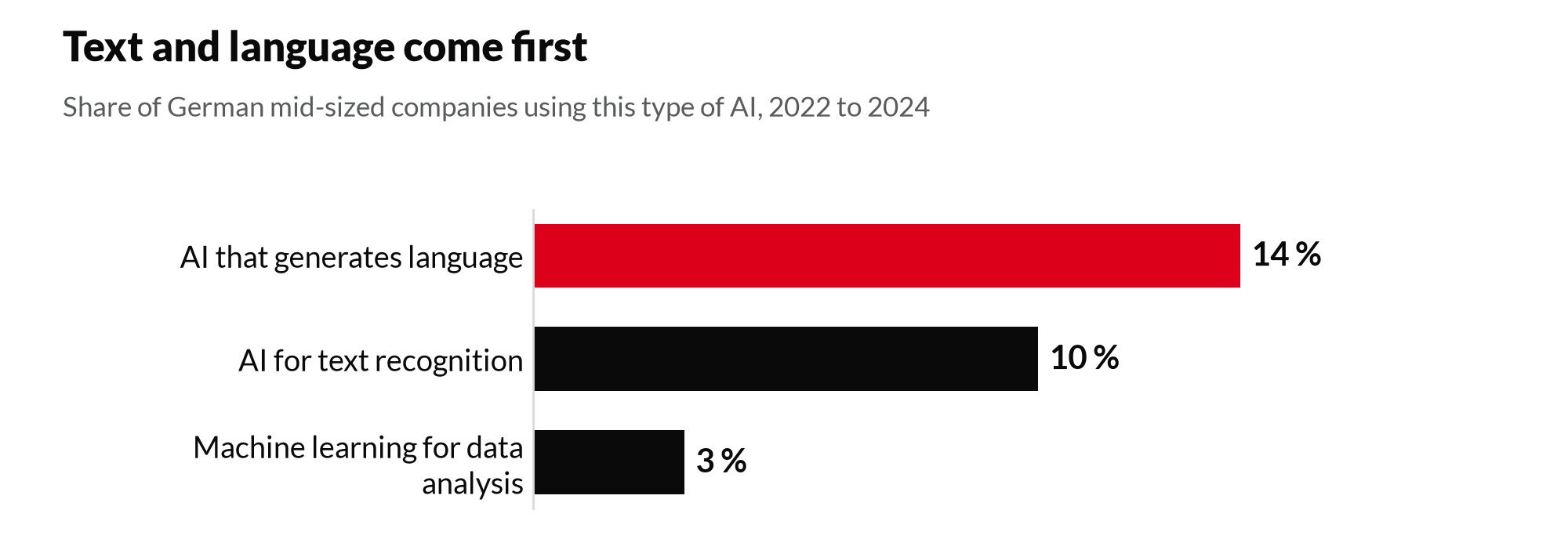
- Language and text applications are the most common form of AI in German mid-sized companies: 14 percent use AI that generates language and 10 percent use AI for text recognition (KfW, 2022 to 2024).
- The five starter use cases share a pattern: lots of text, clear rules, high repetition and a person who checks the result.
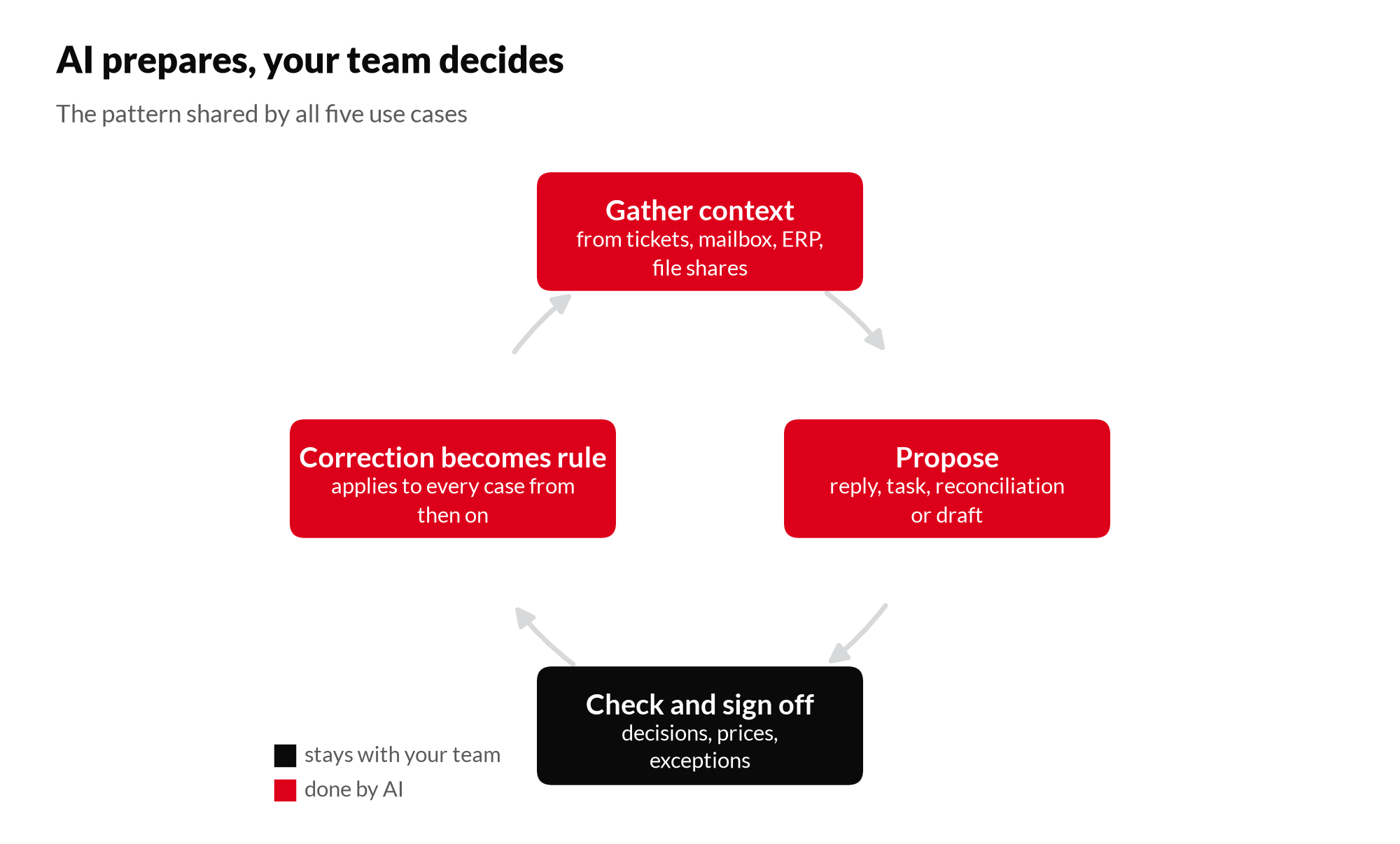
- AI does the groundwork: finding context, sorting, matching and drafting. Decisions and sign-off stay with the team.
- The best first use case is the one that costs the most time today and whose data is already digital.
Why are these five AI use cases a good place to start?
These five use cases work well because they rely on the AI capabilities that are most mature and most widely used today: understanding and generating text. According to the KfW SME Panel, 14 percent of German mid-sized companies used AI that generates language between 2022 and 2024, and 10 percent used AI to analyse text. KfW names answering customer enquiries, pre-sorting incoming emails, automated invoice processing and using AI as a knowledge source as typical applications.
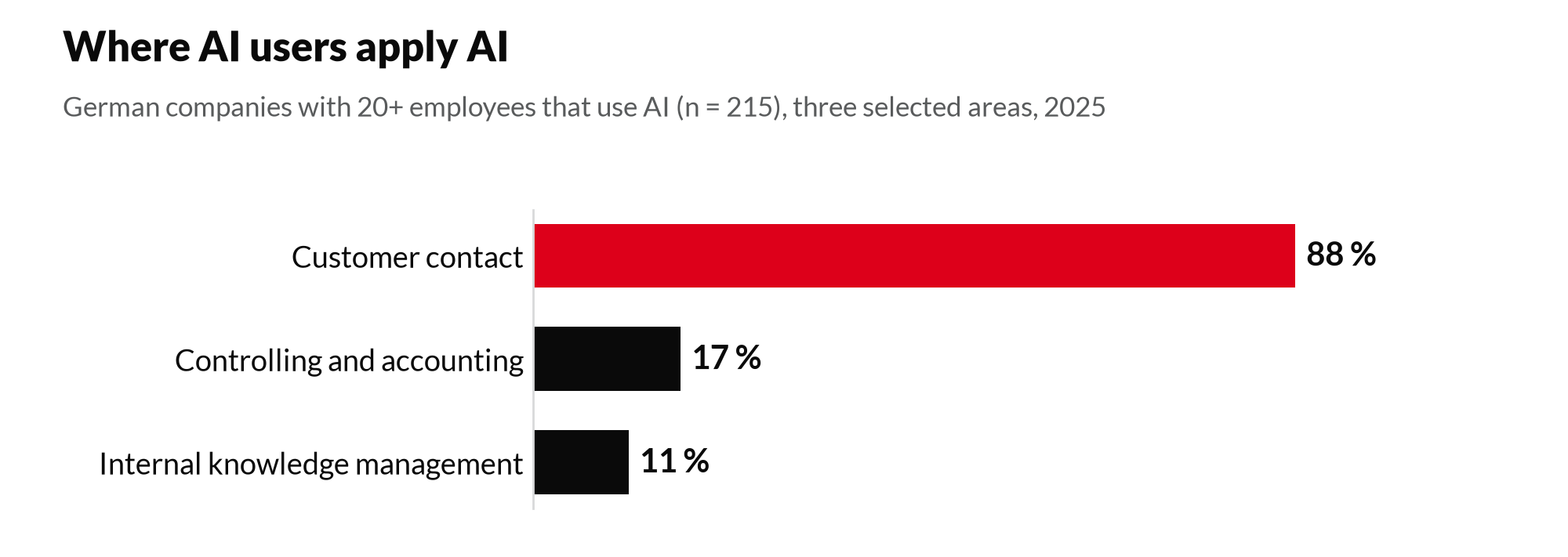
Companies themselves also use AI mainly in these areas. Among the AI users in Bitkom's 2025 survey (215 German companies with 20 or more employees), customer contact leads by far at 88 percent. 17 percent use AI in controlling and accounting, and 11 percent in internal knowledge management. In May 2026, the ifo Institute listed administration, correspondence and information research among the most common uses, with many companies also using AI for customer communication.
| Use case | What AI does | What stays with people | Typical data sources |
|---|---|---|---|
| Customer enquiries | Gathers context, suggests a reply | Checks and sends the reply | Ticket system, CRM, orders |
| Email triage | Reads, classifies, creates tasks | Confirms priorities | Mailbox, ticket system |
| Invoice processing | Extracts data, matches it, flags discrepancies | Approves, resolves exceptions | Incoming invoices, ERP, bank |
| Quote preparation | Analyses the request, drafts a quote | Prices, terms, sign-off | CRM, past quotes, product data |
| Knowledge search | Finds answers with sources | Judges and applies them | File storage, manuals, wiki |
How can AI help with customer enquiries?
AI helps most with customer enquiries by pulling together the context and proposing a well-founded reply. Service teams spend a lot of time finding out who the customer is, what they bought and what happened last. That information usually sits in several systems.
In our own operations, every incoming ticket is automatically enriched with purchase history, account balance, version and previous requests. For payment questions, an agent checks the backend and the payment provider in parallel and presents its findings with a draft reply. A person still makes the decision, and staff corrections flow back in as rules. Read more in our customer service use case.
How does AI triage incoming emails?
AI triages emails by reading each message, classifying it and turning it into a concrete task. Reading is rarely the bottleneck. The hard part is getting from a message to a task with a deadline and an owner.
One example from our own operations is notices from vendors and hosting providers about end of life, maintenance and deadlines. These emails are polite, mention a date far in the future and get left unread. An agent checks whether one of our systems is affected and only then creates a ticket with deadline, priority and owner. Often the answer is that nothing needs to be done, which would otherwise take a quarter of an hour of research. Our end-of-life emails use case shows the full workflow.
How does AI support invoice processing?
AI supports invoice processing by extracting invoice data, matching it against orders and payments and flagging discrepancies. KfW points out that text applications like this need deeper integration into existing IT than a simple writing tool. That is exactly the difference between a tool and a process.
In our own operations, an agent continuously reconciles payment provider and bank data against the expected amounts from invoices and subscriptions, rather than waiting for month end. Discrepancies and duplicates are flagged, never silently corrected. Booking and resolving exceptions stay with the finance team. Read more in our finance and controlling use case.
Can AI prepare quotes?
Yes, AI can prepare quotes well, but responsibility for price and content stays with sales. An agent reads the request, finds comparable past quotes and matching product data, and turns them into a draft. If information is missing, it lists the open questions for the customer.
The boundary matters: a person sets prices, discounts and terms. AI prepares; it does not negotiate. This use case pays off mainly where many similar requests come in and preparation currently ties up experienced staff. That is our assessment from experience, not a promise for every business.
How does AI find knowledge inside your company?
AI finds knowledge by searching manuals, file shares and past cases and returning answers with their sources. The source is what makes the answer usable: only if you can check where it came from can you trust it. KfW explicitly lists AI as a knowledge source among the uses of language applications. Yet according to Bitkom, only 11 percent of companies that use AI apply it to internal knowledge management so far.
Before you start, settle who may see what. An agent should only access the documents its task requires and must not pass confidential content to people without permission. Our page on data security and hosting explains how we handle access rights and logging.
Which AI use case fits your company?
The right first use case is the one that costs the most time today and whose data is already digital. Three questions help you choose:
- Where do your experts spend hours every week searching, sorting or retyping?
- Is the information they need in a system an agent can read?
- Is there a person who knows the process and wants to check the first results?
If you can answer yes to all three for one use case, you have a good candidate for a pilot. In the next article in this series, we share a scoring matrix for comparing several candidates.
Frequently asked questions
Which AI use case delivers value fastest in a mid-sized company?
Use cases with high volume and good data usually pay off fastest, often customer enquiries or email triage. Every minute saved there adds up many times a week. Which one it is in your company depends on where most time is lost today.
Do we need new software for these use cases?
Usually not. The agents work inside your existing systems, such as the ticket system, mailbox, ERP or file storage, and read the data there. What is new is the integration, not the tool your team works with. Agents only write after approval, for example a ticket or a draft.
What happens when the AI makes a mistake?
That is why a person sits at the decisive point in all five use cases. AI proposes, the team checks and signs off. Corrections are stored as rules and apply to every later case, so the system becomes more accurate over time instead of repeating the same mistake.
Conclusion
For mid-sized companies, the easiest way into AI is through text: enquiries, emails, invoices, quotes and internal knowledge. In all five use cases, AI does the groundwork and the team keeps the decision. Which one comes first depends on where time is lost today and on your data, not on the technology.
Want to know which use case fits you first? In a free initial conversation, we assess your candidates together. Get in touch
This article was written with AI assistance and editorially reviewed and approved by the Venista AI Studio team.